Entry, Escalation, Persistence: Taking Apart Frappe's Document Follow
Frappe is an open-source framework used to build software like ERPNext, a widely deployed open-source ERP. My job is mostly working with apps built on this framework. During one session in May I noticed some peculiarities with how frappe’s document follow feature is implemented. Curious, I dug deep to find a chain of three authorization failures - one at the object level, one at the field level, and one in the lifetime of the grant itself - that allowed an attacker to access data they aren’t authorized to.
The frappe team promptly acknowledged the vulnerabilities and started work on it. The vulnerability chain was patched and labeled CVE-2026-66000, CVE-2026-66058, and CVE-2026-66059.
| Timeline: |
|---|
| May 27 2026 8:10 PM IST - Issue filed to frappe team |
| May 27 2026 9:00 PM IST - Issue acknowledged |
| Jun 8 2026 1:25 PM IST - Pull Request opened with the fixes by Aarol D’Souza and me. |
| Jun 16 2026 10:09 PM IST - Frappe v16.23.0 ships with the fix. |
| Jun 16 2026 10:18 PM IST - Frappe v15.112.0 ships with the fix. |
| Jul 30 2026 10:50 AM IST - The 3 vulnerabilities were officially published as security advisories. |
Ok now with that out of the way, let us start by figuring out what frappe document follow even is.
What is document follow?

It’s funny how I’m seeing this message now while writing the blog. The feature is slated to deprecate on v17.
If you’re used to ERP/CRM systems, you must’ve encountered this feature before in slightly different forms: Salesforce calls it following records, and Microsoft Dynamics 365 has its own equivalent. Every system that grows past a handful of users eventually develops this feature, because it’s the obvious answer to an obvious question: how do I find out when this thing changes without opening it every morning?
Frappe’s answer is Document Follow. You open a document - an Employee record, a Sales Order, an Opportunity, whatever - hit follow, and Frappe emails you when it changes. That’s it. That’s the whole feature.
But now if you look inside the button, fundamentally it is a feature that says: this user should be informed about the changes to this document In Frappe, a DocType is the name of the database table. Documents are rows in those tables. For example, there’ll be a database table called Leads, each lead (document) is then a row in that table. Keep this in mind to avoid confusion when I say document / DocType. , on an ongoing basis, by email. It’s a standing subscription to a document’s data.
Once you say it that way, three questions ask themselves:
- Who’s allowed to create one of those rows?
- What exactly goes into the email?
- What happens to the row when the user’s access changes?
This post is about each of them, in that order.
So who’s allowed to follow a document?
Any authenticated system user A system user is anyone who can access the Desk view. Desk view in frappe means the low-code backend UI. Any user with a role is automatically a system user. with document follow enabled from their user settings. The doctype should also support version tracking. And that is our entry vulnerability aka CVE-2026-66058. The reason for this was the lack of an access control check, the server forgot to ask whether the client is actually authorized to access this document.
Request
    curl -X POST "https://<site>/api/method/frappe.desk.form.document_follow.update_follow" \
    -H "Content-Type: application/json" \
    -H "Cookie: sid=<valid_sid>" \
    -H "X-Frappe-CSRF-Token: <csrf_token>" \
    --data '{
        "doctype": "Employee",
        "doc_name": "EMP-XXXXX",
        "following": true
    }'
Response
    {
        "message": true,
        "_server_messages": "[\"{\\\"message\\\":\\\"Following document <doc id>\\\",\\\"as_table\\\":false,\\\"title\\\":\\\"Message\\\",\\\"alert\\\":1}\"]"
    }
The fix is a simple 2-liner.
	if not frappe.has_permission(doctype, "read", doc=doc_name, user=user):
		frappe.throw(_("You do not have permission to access this document."), frappe.PermissionError)
So this meant any user could follow any arbitrary document with Track Changes enabled Sensitive doctypes like Employee from ERPNext, most of HR and Payroll Doctypes from HRMS ship with this enabled by default , no matter how sensitive, and get updates siphoned to them regularly.
So what exactly goes into the email?
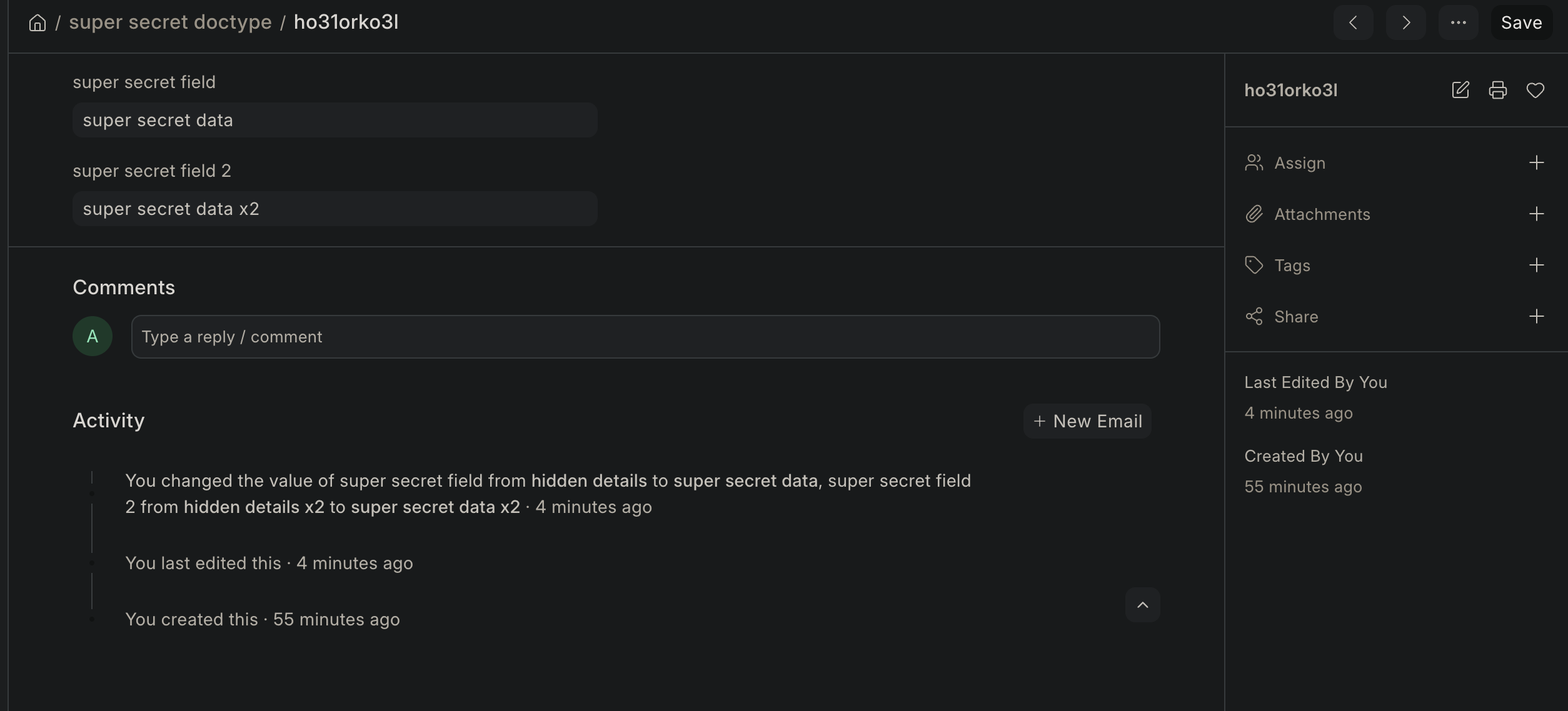
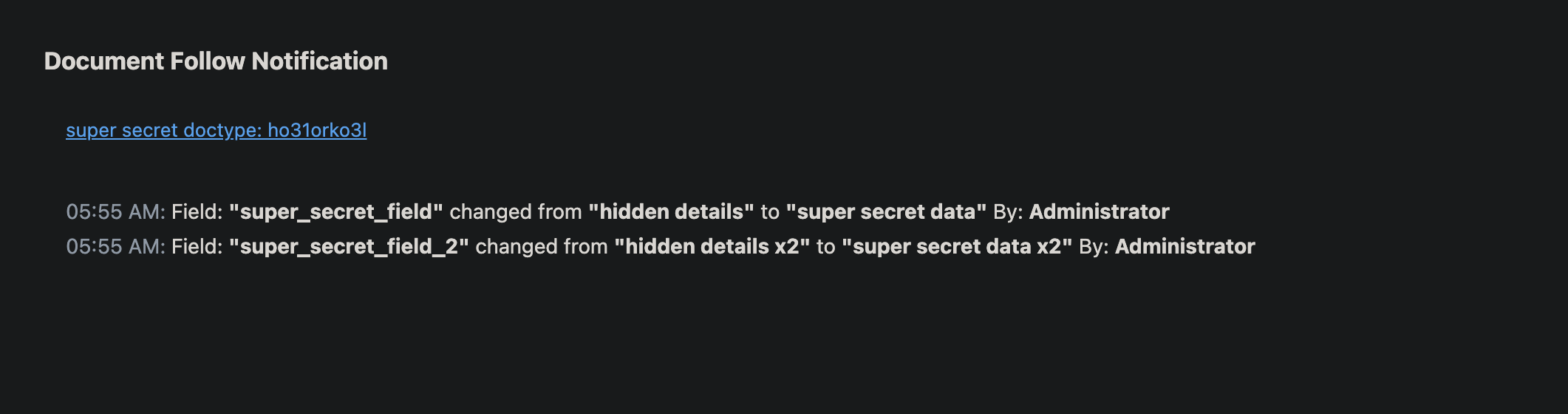
We followed it regardless, and this is the email received when a change happens.
So once the document gets an update, the diff is logged in a Version table and then a parser is used to make a good looking email from it to send to the client. This is where the second vulnerability lives. It is just a bug if all you can do is follow arbitrary documents; it becomes a vulnerability when the data actually is shared. And that is CVE-2026-66059.
The parser did not check whether the data it was stitching together for the client was actually authorized to them. The Version table is a sensitive field with full diff info; it is the job of the parser to ignore higher perm’d fields from it when sending the email to users.
So if you chain together
 lol
CVE-2026-66058 and CVE-2026-66059 you get the ability to:
lol
CVE-2026-66058 and CVE-2026-66059 you get the ability to:
- follow any document to be really precise anything except this. in the system.
- get emails continuously when those documents are updated.
Now let’s look at the 3rd part - persistence.
So what happens to the row when the user’s access changes?
So what if we had a user who got their permissions revoked or reduced. Turns out revoking a document follow is a very tricky thing. They will continue to keep getting emails from the frappe server. And that is CVE-2026-66000.
Aarol D’Souza had a nice fix for this by checking the access before each email is fired. This saved a lot of trouble; now all that the sysadmins have to do is update the frappe version and everything will be handled for them.
How to audit the system if you’re a sysadmin
If you want to audit the system to confirm your exposure to this vulnerability chain, you’ll need to check your email logs. Do not stop after checking Document Follow list because unfollowing a document was also open.
Request
    curl -X POST "https://<site>/api/method/frappe.desk.form.document_follow.update_follow" \
    -H "Content-Type: application/json" \
    -H "Cookie: sid=<valid_sid>" \
    -H "X-Frappe-CSRF-Token: <csrf_token>" \
    --data '{
        "doctype": "super secret doctype",
        "doc_name": "ho31orko3l",
        "following": false
    }'
Response
    {
        "message": false,
        "_server_messages": "[\"{\\\"message\\\":\\\"Un-following document <doc id>\\\",\\\"as_table\\\":false,\\\"title\\\":\\\"Message\\\",\\\"alert\\\":1}\"]"
    }
Takeaways
-
The key takeaway is authentication != authorization. Keep checking all the time, on all endpoints / features. Obsessively.
-
Keep your frappe versions updated. Dependabot won’t warn you about frappe advisories because the apps are standalone and don’t mention frappe as a dependency. You’ll have to manually keep an eye on the releases.
From everything I’ve observed, cyber incidents are going to spike initially (happening now) due to the improved models and then will plateau and then decline. Models are very good at scanning codebases. This blog by trail of bits was a very cool read. Let your AI do codebase wide, dependency wide audits and you’ll catch issues. This can pair very well with manual pentesting.
Conclusion
Software quality isn’t measured by whether it has ever had security flaws. Every sufficiently large codebase does. It’s measured by what happens when someone finds one.
Frappe is open source, which means it’s auditable by anyone who’s curious enough to read it. It has a working security advisory process. It acknowledged the report in 50 minutes, shipped fixes to two release branches, and published the advisories properly.
I trust teams that are open and fast to act more than teams that are private and silent. The bugs are the same either way. The difference is whether you find out.
This is the first thing I’ve ever written up. There’s another security post brewing that I’m very excited about. I got inspired to write this after reading Nisarga’s writeup on CBSE Hack and Lachlan’s React2Shell Story. Thanks to Grecil and Harish for reading drafts of this post.
Thank you for reading ❤️ If you’ve any feedback/ideas feel free to me.